Vibe-Coding an AI Agents Usage Dashboard
None of these AI coding agents — ChatGPT/Codex, Claude, Kimi Code, Z-AI — publish their usage limits via a documented API. If you want to know how close you are to a rate limit, you open each dashboard separately and squint at progress bars. I wanted one view for all of them.
So I vibe-coded AgentsUsageDashboard: a single web dashboard plus a Stream Deck+ plugin that shows real-time usage, reset countdowns, and plan info for all four providers at a glance.
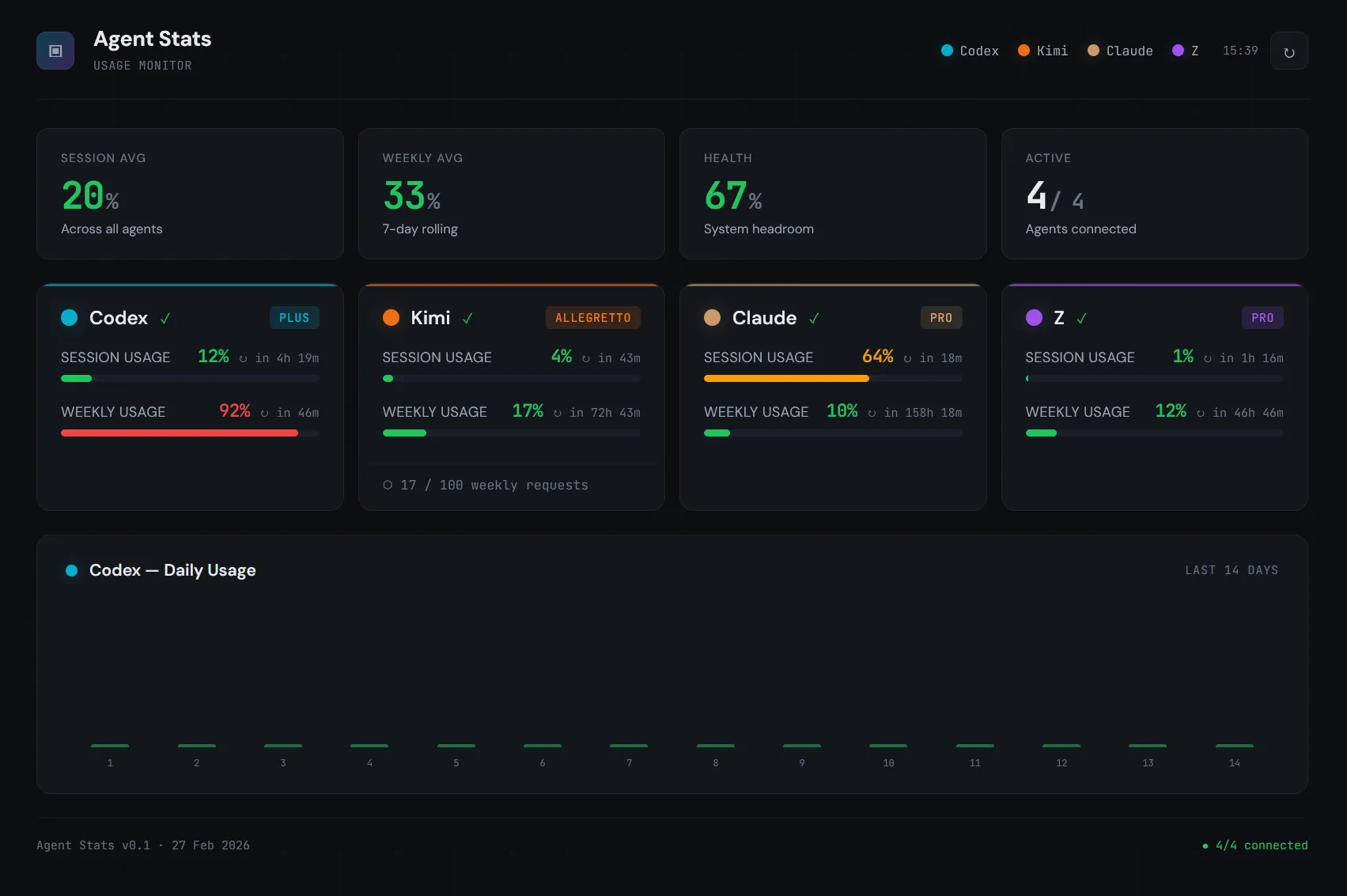
The hard part wasn’t building the dashboard — it was reverse-engineering the endpoints. Figuring out that Kimi’s scope must be an array not a string, that Z-AI timestamps are in milliseconds, that Claude’s org list can contain non-dict entries — each of these cost hours of debugging. This article compresses those hours into a few lines, so you don’t repeat them.
⚠️ Important: this setup depends on unofficial, reverse-engineered endpoints. Assume they can change at any time: paths, headers, auth flow, and response fields.
Quick architecture
- Backend: Python/Flask polling every 5 minutes.
- Session strategy: one logged-in Firefox in Docker (noVNC), then reuse cookies/localStorage.
- Transport:
curl_cffiwith Firefox impersonation for browser-like TLS fingerprinting. - Frontend: one vanilla HTML/CSS/JS dashboard (session + weekly bars, status, countdowns, Codex 14-day chart).
- Infra: two containers (Firefox + Dashboard) with shared
firefox_datavolume. - Hardware layer: Stream Deck+ plugin for glanceable real-time usage.
Docker Compose
The whole infra is two containers. Firefox runs a headless browser with noVNC for manual login. The dashboard mounts the same volume read-only and scrapes cookies from it.
services:
  firefox:
    image: jlesage/firefox:latest
    ports:
      - "5800:5800"
    volumes:
      - firefox_data:/config
    environment:
      - TZ=Europe/Warsaw
    restart: unless-stopped
    healthcheck:
      test: ["CMD-SHELL", "wget -q --spider http://localhost:5800 || exit 1"]
      interval: 30s
      timeout: 5s
      retries: 5
      start_period: 30s

  dashboard:
    image: agent-stats-dashboard:latest
    ports:
      - "8777:8777"
    volumes:
      - firefox_data:/firefox:ro
    environment:
      - TZ=Europe/Warsaw
      - REFRESH_INTERVAL=300
      - ZAI_API_KEY=${ZAI_API_KEY:-}
    depends_on:
      firefox:
        condition: service_healthy
    restart: unless-stopped

volumes:
  firefox_data:
Open localhost:5800, log into ChatGPT, Kimi, and Claude in Firefox, and the dashboard picks up the sessions automatically. Z-AI uses an API key via env var instead.
Reading Firefox cookies safely
Firefox locks its SQLite databases while running. The trick: copy the DB (plus WAL and SHM files) to /tmp, then query the copy.
def _copy_sqlite(src_path, tmp_name):
    """Copy SQLite DB + WAL + SHM to /tmp for safe reading."""
    tmp_dir = Path(f"/tmp/{tmp_name}")
    tmp_dir.mkdir(exist_ok=True)
    tmp_db = tmp_dir / src_path.name
    shutil.copy2(src_path, tmp_db)
    for suffix in ["-wal", "-shm"]:
        wal = src_path.parent / f"{src_path.name}{suffix}"
        if wal.exists():
            shutil.copy2(wal, tmp_dir / f"{src_path.name}{suffix}")
    return tmp_db

def _read_cookies(domain):
    profile = _find_profile()       # auto-detect jlesage or standard
    tmp_db = _copy_sqlite(profile / "cookies.sqlite", "cookie_read")
    conn = sqlite3.connect(str(tmp_db))
    cur = conn.execute(
        "SELECT name, value FROM moz_cookies WHERE host LIKE ?",
        (f"%{domain}%",),
    )
    cookies = cur.fetchall()
    conn.close()
    return cookies
For localStorage (needed by Z-AI fallback), Firefox 79+ stores per-origin SQLite databases in a different path:
{profile}/storage/default/https+++chat.z.ai/ls/data.sqliteTable data, columns key and value (UTF-8 blob). Same copy-before-read pattern applies.
Auth: four providers, four strategies
Each provider needs different auth. I wrapped each in a fetch_*() adapter that returns the same normalized shape.
Codex — cookie to bearer exchange:
GET https://chatgpt.com/api/auth/session
Cookie: __Secure-next-auth.session-token=...

→ { "accessToken": "eyJhb..." }
Kimi — the kimi-auth cookie is already the bearer token, but the endpoint uses Connect protocol:
POST https://www.kimi.com/apiv2/kimi.gateway.billing.v1.BillingService/GetUsages
Headers: connect-protocol-version: 1, x-msh-platform: web
Body: { "scope": ["FEATURE_CODING"] }   ← must be an array, not string
Claude — full cookie string, with an org lookup step:
GET https://claude.ai/api/organizations         → find org with "chat" capability
GET https://claude.ai/api/organizations/{org_id}/usage
Headers: anthropic-client-platform: web_claude.ai
Z-AI — API key in id.secret format, wrapped in JWT:
def _zai_jwt(api_key: str) -> str:
    kid, secret = api_key.split(".", 1)
    now_ms = int(time.time() * 1000)
    payload = {
        "api_key": kid,
        "exp": now_ms + 3600 * 1000,
        "timestamp": now_ms,
    }
    return jwt.encode(payload, secret, algorithm="HS256",
                      headers={"alg": "HS256", "sign_type": "SIGN"})
All HTTP calls go through curl_cffi with impersonate="ff120" for TLS fingerprint matching — without it, Cloudflare blocks you.
Response mapping: raw to normalized
Each provider returns a different shape. The adapter’s job is to map it into the internal schema. Here’s Codex as an example — the raw response from /backend-api/wham/usage:
{
  "plan_type": "plus",
  "rate_limit": {
    "primary_window": {
      "used_percent": 42.0,
      "reset_after_seconds": 14400,
      "reset_at": 1772143992
    },
    "secondary_window": {
      "used_percent": 88.0,
      "reset_after_seconds": 68976,
      "reset_at": 1772206105
    }
  }
}
Gets normalized to:
{
  "status": "ok",
  "plan": "plus",
  "session": { "usage_pct": 42.0, "remaining_seconds": 14400 },
  "weekly":  { "usage_pct": 88.0, "remaining_seconds": 68976 },
  "error": null
}
primary_window → session, secondary_window → weekly. The field used_percent maps to usage_pct (Codex also sometimes returns usage_percent — support both). Timestamps are converted to remaining_seconds in the adapter so the frontend never thinks about time math.
Kimi — GetUsages returns a nested structure where all numeric values are strings:
{
  "usages": [{
    "detail": {
      "limit": "500",
      "used": "123",
      "remaining": "377",
      "resetTime": "2026-03-06T00:00:00Z"
    },
    "limits": [{
      "detail": {
        "limit": "30",
        "remaining": "28",
        "resetTime": "2026-02-27T14:35:00Z"
      }
    }]
  }]
}
usages[0].detail is the weekly quota (requests used out of plan limit). usages[0].limits[0].detail is the rate limit — a 5-minute sliding window. All values are strings, so cast with int(). The percentage is calculated: used / limit * 100. Plan name comes from a separate call to GetSubscription → subscription.goods.title (e.g. “Allegretto”).
Claude — the usage endpoint returns windows keyed by time span, plus per-model breakdowns:
{
  "five_hour": {
    "utilization": 35.2,
    "resets_at": "2026-02-27T19:30:00Z"
  },
  "seven_day": {
    "utilization": 62.1,
    "resets_at": "2026-03-06T14:30:00Z"
  },
  "seven_day_sonnet": { "utilization": 45.0, "resets_at": "..." },
  "seven_day_opus":   { "utilization": 12.0, "resets_at": "..." }
}
five_hour → session, seven_day → weekly. The field utilization maps to usage_pct, resets_at is ISO-8601. The catch: any of these fields can be None instead of a dict. Not missing — present but None. So usage.get("five_hour", {}) still blows up because you get None, not a missing key. You need an explicit guard: val if isinstance(val, dict) else {}.
Z-AI — returns an array of limit objects with different type/unit combinations:
{
  "success": true,
  "data": {
    "level": "premium",
    "limits": [
      {
        "type": "TOKENS_LIMIT",
        "unit": 3,
        "percentage": 42.0,
        "nextResetTime": 1772143992000
      },
      {
        "type": "TOKENS_LIMIT",
        "unit": 6,
        "percentage": 88.0,
        "nextResetTime": 1772606105000
      },
      {
        "type": "TIME_LIMIT",
        "percentage": 15.0,
        "nextResetTime": 1772137200000
      }
    ]
  }
}
Decode by type + unit: TOKENS_LIMIT with unit=3 is the 5-hour session window, unit=6 is weekly. TIME_LIMIT is an hourly request cap (use as session fallback). The percentage field is the usage percent directly (0–100) — don’t calculate it from usage/limit. And nextResetTime is Unix milliseconds, not seconds — divide by 1000 before converting.
Every provider maps into the same { status, plan, session, weekly, error } shape — different source fields, same output.
The /api/data contract
The backend caches all normalized results and exposes them at GET /api/data:
{
  "codex": {
    "status": "ok",
    "plan": "plus",
    "session": { "usage_pct": 42.0, "remaining_seconds": 14400 },
    "weekly":  { "usage_pct": 88.0, "remaining_seconds": 68976 },
    "error": null,
    "last_success": "2026-02-27T14:30:00+00:00"
  },
  "kimi":   { "status": "ok", "session": { "..." }, "weekly": { "..." } },
  "claude": { "status": "ok", "session": { "..." }, "weekly": { "..." } },
  "zai":    { "status": "stale", "error": "timeout", "..." },
  "last_fetch": "2026-02-27T14:30:00+00:00",
  "next_refresh_at": "2026-02-27T14:35:00+00:00"
}
Status can be ok, error, offline, or stale (previous data available but last fetch failed). The frontend uses next_refresh_at to schedule its polling — no fixed interval, it syncs with the backend cycle.
Polling and cache
The backend runs a daemon thread that fetches all providers sequentially every 5 minutes. Thread-safe cache with two locks: one for read/write (_lock), one to prevent overlapping fetches (_fetch_lock).
REFRESH_INTERVAL = int(os.environ.get("REFRESH_INTERVAL", "300"))

def _do_fetch():
    if not _fetch_lock.acquire(blocking=False):
        return   # skip if already running
    try:
        results = {}
        for name, fetcher in FETCHERS:
            try:
                results[name] = fetcher()
            except Exception as e:
                # graceful degradation: keep stale data
                prev = _cache.get(name)
                if prev and prev.get("last_success"):
                    results[name] = {**prev, "status": "stale", "error": str(e)}
                else:
                    results[name] = {"status": "error", "error": str(e)}

        results["last_fetch"] = datetime.now(timezone.utc).isoformat()
        results["next_refresh_at"] = (
            datetime.now(timezone.utc) + timedelta(seconds=REFRESH_INTERVAL)
        ).isoformat()

        with _lock:
            _cache.update(results)
    finally:
        _fetch_lock.release()
On error, if there’s previous successful data it degrades to stale instead of disappearing. The frontend shows a status dot so you always know what’s live and what’s cached.
Stream Deck+ plugin
I also built a dedicated Stream Deck+ plugin so I can glance at usage without switching windows. Each of the four encoders (touch dials) shows one agent with two progress bars and color-coded status.
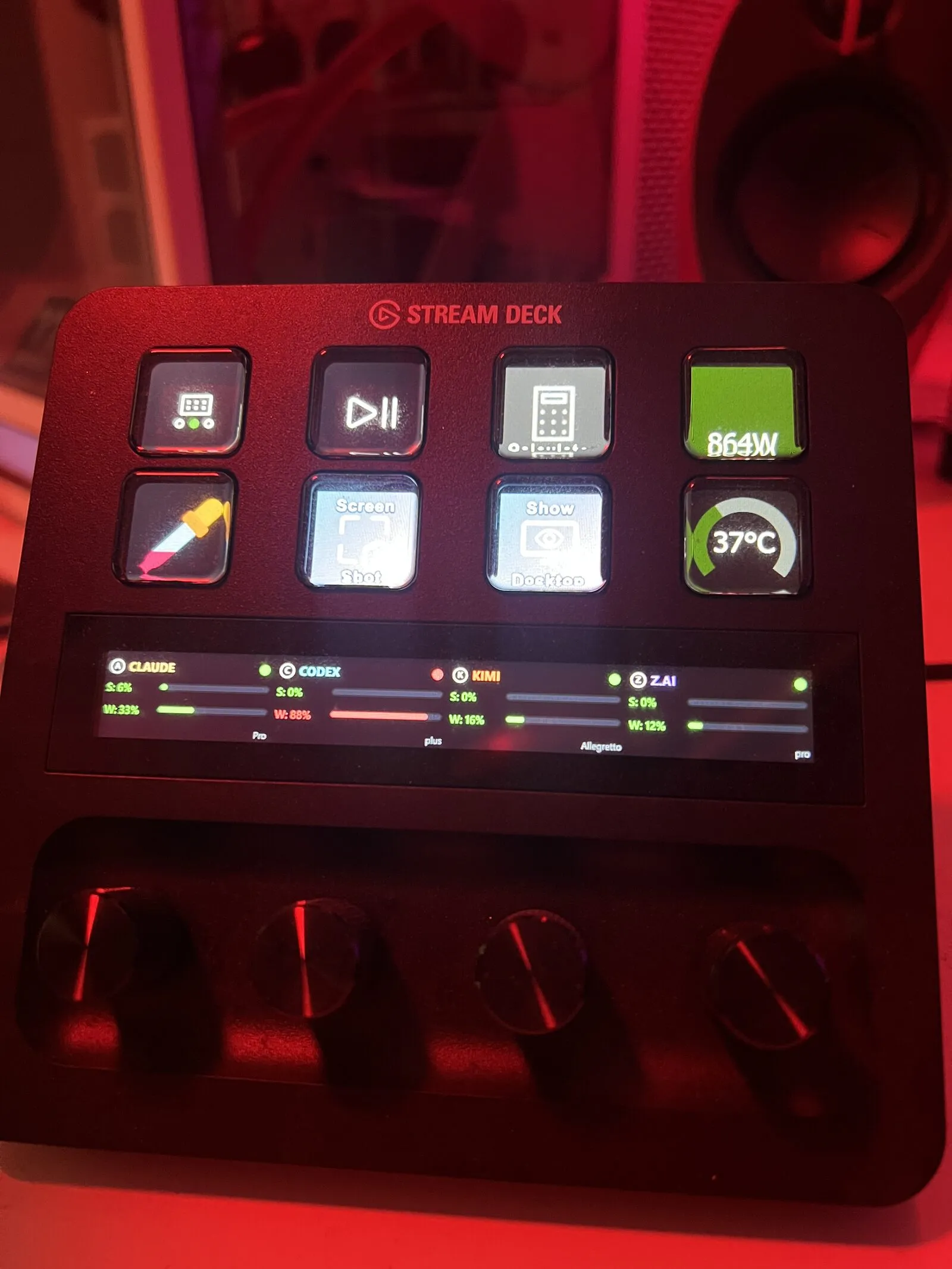
Architecture: Node.js plugin using @elgato/streamdeck SDK. It polls the same /api/data endpoint, so the dashboard backend is the single source of truth.
Three views per encoder, cycled by rotating the dial:
- Default — agent name, session bar, weekly bar, plan badge
- Session detail — large percentage, bar, reset countdown
- Weekly detail — same layout, weekly data
The layout is a custom JSON definition for the touch strip:
{
  "id": "agent-default",
  "items": [
    { "key": "agent-icon",    "type": "pixmap", "rect": [4, 2, 20, 20] },
    { "key": "agent-name",    "type": "text",   "rect": [28, 0, 120, 22] },
    { "key": "status-dot",    "type": "pixmap", "rect": [180, 4, 16, 16] },
    { "key": "session-label", "type": "text",   "rect": [4, 26, 58, 20] },
    { "key": "session-bar",   "type": "bar",    "rect": [66, 30, 130, 10] },
    { "key": "weekly-label",  "type": "text",   "rect": [4, 52, 58, 20] },
    { "key": "weekly-bar",    "type": "bar",    "rect": [66, 56, 130, 10] }
  ]
}
Color thresholds match the web dashboard: green below 40%, amber 40-70%, red above 70%. Push to refresh, touch to open the web dashboard.
Advice so you don’t repeat my mistakes
-
Normalize provider data early Define one internal schema (
usage_pct,remaining_seconds,plan) and map each provider into it. Don’t let provider-specific shapes leak into UI. -
Treat auth as provider-specific adapters Each provider has a completely different auth flow (see above). Keep them isolated — when one breaks, the others keep working.
-
Parse defensively, always Some fields are missing or
None(especially Claude). Guard dict access and add sane fallbacks. -
Expect timestamp/unit mismatches Some resets are seconds, some milliseconds (Z-AI). Convert once in adapter layer.
-
Respect browser storage reality Firefox 79+ uses LSNG per-origin SQLite files, not only legacy
webappsstore.sqlite. -
Avoid SQLite lock pain If Firefox writes while you read, WAL locks happen. Copy DB files to
/tmpfirst, then query copies. -
Keep the vibe, add guardrails Vibe coding is great for momentum, but for unstable APIs you still need adapter boundaries, retries, and structured logs. Fast iteration + defensive engineering is the sweet spot.
Endpoint gotchas worth knowing
- Codex: usage fields may be
used_percentorusage_percent; support both. - Kimi:
scopefor usage must be an array (["FEATURE_CODING"]), not a string. - Kimi:
GetUsagesandGetSubscriptionlive under different service packages (billing.v1vsorder.v1). - Claude: find the org with
"chat"capability, cache org UUID, and guard non-dict records. - Z-AI:
nextResetTimeis in milliseconds; token/auth errors come assuccess: false+401. - Z-AI: limit types decode as
TOKENS_LIMITunit 3 = 5-hour session, unit 6 = weekly.
If you build this, design for drift: version adapters per provider, keep raw response logs, and assume tomorrow’s payload won’t be today’s payload.
The whole project took a day of vibe-coding, but most of that time was spent on reverse-engineering — intercepting requests in DevTools, guessing header combinations, decoding undocumented error formats. The actual dashboard code was fast once I knew what to call and how.
That’s the real value of this article: not the code (you can write your own), but the map. The endpoints, the auth quirks, the field name inconsistencies, the millisecond-vs-second traps — that’s what costs hours. Now you have it in one place.
The full source code — backend, frontend, Docker setup, and Stream Deck+ plugin — is on GitHub: AgentsUsageDashboard.